There are two methods for Gatorworks to obtain access to your Google Ad account. Please inform your account manager which one you’d like to proceed with.
Method 1 – Granting Access to a Google Ads Account
STEP 1: Log into your Google Ad account in ads.google.com
STEP 2: To add a new user to your Google Ads account click on “Admin” on the left and select “Account access and security”.
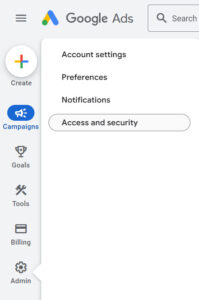
STEP 3: Click the blue plus sign in the top left.

STEP 4: Add gatorworksweb@gmail.com email, select “Admin” access, then click “Send Invitation”.

STEP 5: Notify your account manager about sending access to Gatorworks – thank you!
Method 2 – Approving a Google Ads access
STEP 1: In order to request access to your Google Ads account, you’ll have to give us your account number. It’s the 10 digit number at the top right of your Google ads account when logging in.
STEP 2: After Gatorworks requests access, you’ll receive an email from Google with the information about the request and a blue button that will allow you to accept the user’s request.
STEP 3: The next step is to click on the big blue button to accept the request. You’ll be taken directly inside your manager’s tab in Google Ads. Next click accept.